Family Week Ahead
A scheduled AI agent that reconciles a family's scattered schedule sources and emails a Sunday-morning "Week Ahead" briefing, with one-tap links to add anything missing to the shared calendar. The goal: a digital calendar my wife and I can both trust and easily add to. Built in public, with the product thinking documented as carefully as the code.
View on GitHub ↗- Role
- Product owner, researcher, and builder
- Timeline
- March 2026 – present
- Built with
- Claude scheduled agent · Google Calendar, Gmail & Drive · iCal feeds
- Status
- Live since Oct 25, 2026 · runs every Sunday morning
The problem, twice
Our family's schedule runs on a handwritten calendar in the kitchen. My wife keeps it, and it's our source of truth. But we'd both long wanted a digital calendar too: one we could check from anywhere, trust to be complete, and add to without friction.
The first plan (v1, March 2026) was simple: photograph the paper calendar and have AI turn it into Google Calendar events.
Before automating anything, I interviewed my other user (my wife) and looked at the real data. The problem turned out to be bigger than one calendar, and most of my starting assumptions were wrong.
| What I assumed (v1) | What was actually true (v2) |
|---|---|
| The gap is paper → digital | The gap is five or more sources that never get cross-checked |
| It's my problem | We both miss things: spirit days, tests, schedule changes |
| School info arrives by email | Some does, but most of it lives in ClassDojo notifications and GroupMe |
| Sports schedules need to be read off the wall | The league publishes iCal feeds: structured data, no AI needed |
| Sync events automatically | We want to review before anything lands on the shared calendar |
| The output is a calendar | The output is a weekly briefing. The calendar is one place it can write to. |
Problem statement
Family schedule information arrives through many channels, each owned by a different person or app, and nobody reconciles them. Things fall through the cracks not because nobody wrote them down, but because nobody compared notes.
What it does
Every Sunday morning a cloud agent reads every source (the kitchen calendar photo, league iCal feeds, a shared Family Inbox in Drive and Gmail where ClassDojo posts, school emails, and GroupMe messages land, and last week's saved state), compares them against our shared Google calendar, and emails a briefing to both of us. It proposes, and we decide.
🔎 Call-outs
Double-bookings, handoffs under 45 minutes, games that moved or vanished from the feed, crossed-out paper entries still on Google, practices during school breaks, what to wear or bring from school flyers, unknown abbreviations, and a reminder when the kitchen photo is stale.
📅 This week
Day by day. Anything not yet on Google has a ➕ Add link that opens a pre-filled event.
👀 Next week & further out
Next week in full, then breaks and midterms up to five weeks ahead.
Source footer
Which sources were read and how fresh each one is.
A real Sunday briefing
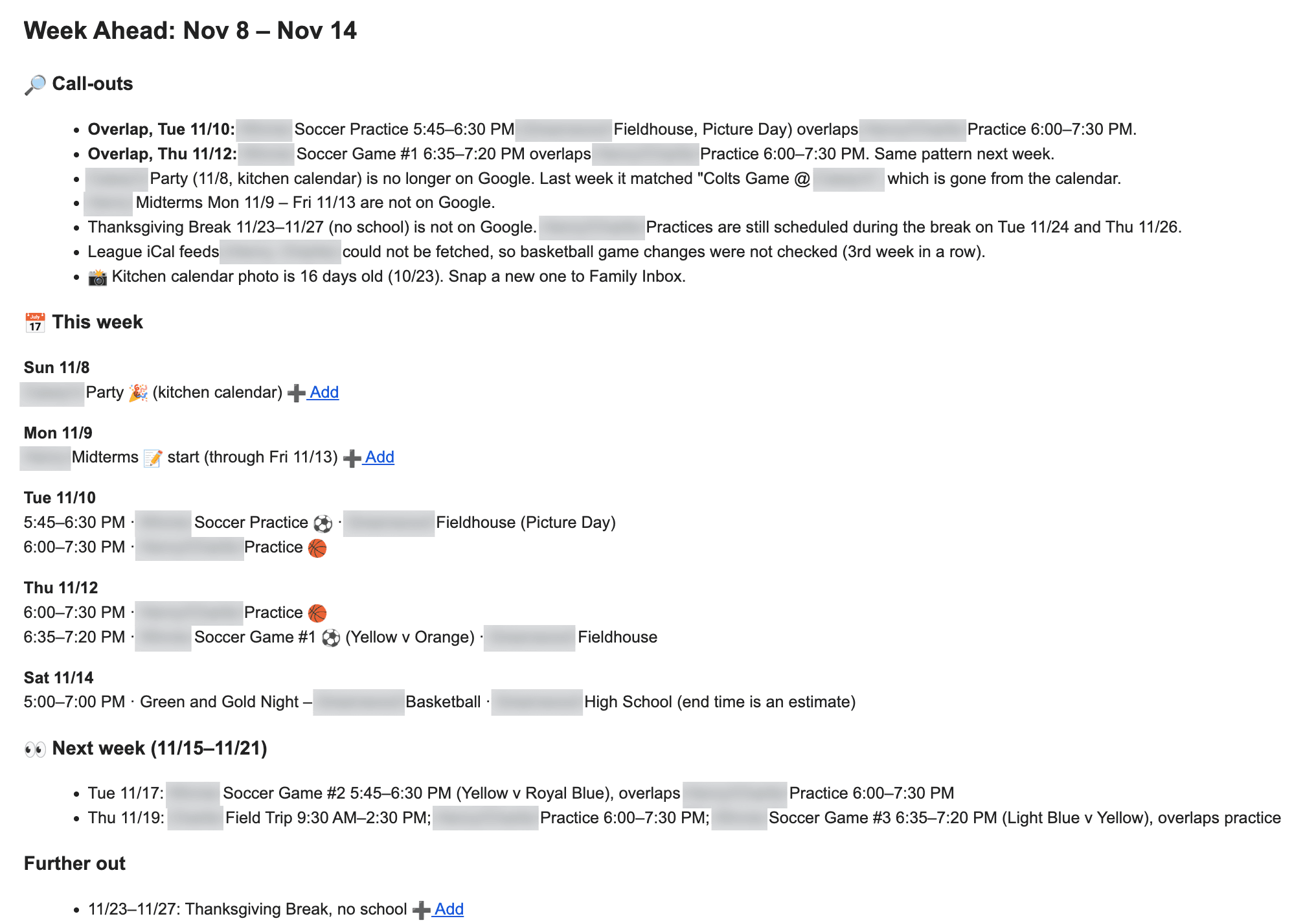
This is the email that landed in both our inboxes on Sunday, November 8 at 8:16 AM. The subject line already does the triage: "Week Ahead: Nov 8 – Nov 14 · 3 to add." Before opening it, we know how much is waiting on us.
Conflicts before they become scrambles
Two kids' activities overlap on both Tuesday and Thursday, and the agent noticed the same pattern repeats next week. That turned a midweek scramble into a Sunday conversation about who drives where.
Changes no one would have spotted
Last week a party on the kitchen calendar matched a Google event. That event has since been deleted, so the party is no longer on the shared calendar. Only a tool that remembers last week's state can catch something that quietly vanished.
Gaps closed in one tap
A week of midterms and Thanksgiving break were nowhere on Google. Each gets a ➕ Add link, so fixing the gap takes one tap, not retyping.
Questions worth asking
Practices are still scheduled during Thanksgiving break. The agent states the fact without guessing, and we decide whether to ask the coach.
Honest about its blind spots
The league feeds had failed to load for the third week in a row, and the kitchen photo was 16 days old. A briefing that says what it couldn't check is one we can trust. That call-out led me to the cause: the cloud agent's network allowlist was blocking the league's calendar feed. I added the domain, and twelve minutes after this email a short follow-up went out with four Saturday games that weren't on Google.
Why it matters
The value isn't the list of events. It's the five-minute Sunday read that replaces cross-checking a wall calendar, two league sites, ClassDojo, and a pile of school emails, and the decisions we get to make before the week starts instead of in the middle of it.
Key decisions
| Decision | Why |
|---|---|
| Propose, don't write | A bad read should never put junk on a calendar we both need to trust. One tap to accept keeps us in control. |
| One capture inbox instead of per-app integrations | ClassDojo and GroupMe have no usable integration. One habit ("if you see it, send it to the Family Inbox") covers them, plus flyers and texts, with no API work or terms-of-service risk. |
| Read feeds directly, don't subscribe | Google refreshes subscribed feeds slowly. Reading them lets the agent detect changes through stable game IDs. |
| Images → Drive, text → Gmail | Tested: the Gmail connector can't read attachments, and Drive OCRs screenshots cleanly. |
| State facts, no guesses | No "buy a gift?" when the agent lacks context. Unknown abbreviations are flagged, never interpreted. |
| Private data lives outside the repo | Names, calendar IDs, feed URLs, and weekly state sit in a private Drive folder. The public repo holds only the method. |
How it got here
Validate AI extraction (no code)
Claude read a photo of the handwritten calendar: every entry correct, kids kept separate, and an unknown abbreviation flagged instead of guessed.
Refine the prompt
Tested on two months of real calendar. It treated crossed-out entries as removed and matched differently worded duplicates across sources.
Validate every input by hand
Each source got a manual test before anything was scheduled. Two failed (Gmail attachments, images inside PDFs), and both changed the design.
Iterate with the real readers
Five test sends in one evening, each changed by feedback: invisible buttons became plain links, helper suggestions were cut, and the agent now re-checks the calendar right before sending.
Run it live
A scheduled Sunday-morning cloud routine with a private config and a weekly state file. The first live briefing went out Sunday, October 25, and it has run every Sunday since.
Results so far
3 Sundays live
Oct 25, Nov 1, and Nov 8 briefings, each in both our inboxes on Sunday morning with no manual step.
19 items
flagged as missing from the shared calendar across those three weeks (2, 10, and 3, plus 4 in a follow-up), each with a one-tap Add link.
Conflicts every week
Two games at different sites overlapping by five minutes, a 30-minute dentist-to-practice handoff, and soccer overlapping basketball practice twice a week.
4 games
missing from Google were caught the same morning the league feeds came back after three weeks of failed fetches.
10 of 12
proposed events were added to the calendar straight from the first test email.
8 games
missing from Google were found in the league feed on the first manual check, including one that overlapped a party.
5 versions
of the briefing in one evening, each driven by a concrete reaction from its actual reader.
What I'm learning
Discovery beats building
The v1 plan was a well-built answer to the wrong question. Twenty minutes of questions and one look at real data reframed it.
Validate inputs before automating
Testing every source by hand surfaced two failures before they could become production bugs.
The best integration is sometimes a habit
One capture rule beat four app integrations.
Keep humans in the loop where trust is fragile
A shared family calendar is high-trust, so proposals beat automation there.
Make failures loud
When the league feeds were blocked, the briefing said so every week instead of quietly skipping them. The cause turned out to be a one-line fix (allowlisting the feed's domain in the agent's network settings), and the first good fetch found four games we would have missed.
Cut what doesn't work quickly
An iOS share-sheet shortcut hit a platform wall, so it's parked. A slightly clunkier path that works beats a slick one that doesn't.